TMS320C28x
Optimizing C/C++ Compiler
v15.9.0.STS User's Guide
SPRU514 - REVISED SEPTEMBER, 2015
1 Introduction to the Software Development Tools
The TMS320C28x™ is supported by a set of software development tools, which includes an optimizing C/C++ compiler, an assembler, a linker, and assorted utilities.
This chapter provides an overview of these tools and introduces the features of the optimizing C/C++ compiler. The assembler and linker are discussed in detail in the TMS320C28x Assembly Language Tools User's Guide.
1.1 Software Development Tools Overview
Figure 1-1 illustrates the software development flow. The shaded portion of the figure highlights the most common path of software development for C language programs. The other portions are peripheral functions that enhance the development process.
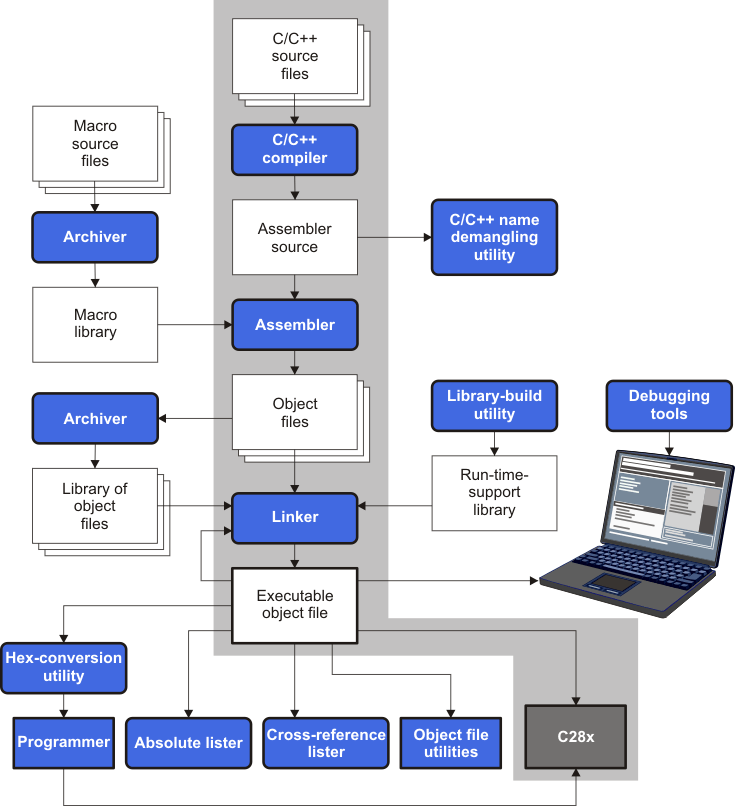
The following list describes the tools that are shown in Figure 1-1:
- The compiler accepts C/C++ source code and produces C28x assembly language source code. See Section 2.
- The assembler translates assembly language source files into machine language relocatable object files. See the TMS320C28x Assembly Language Tools User's Guide.
- The linker combines relocatable object files into a single absolute executable object file. As it creates the executable file, it performs relocation and resolves external references. The linker accepts relocatable object files and object libraries as input. See Section 4 for an overview of the linker. See the TMS320C28x Assembly Language Tools User's Guide for details.
- The archiver allows you to collect a group of files into a single archive file, called a library. The archiver allows you to modify such libraries by deleting, replacing, extracting, or adding members. One of the most useful applications of the archiver is building a library of object files. See the TMS320C28x Assembly Language Tools User's Guide.
- The run-time-support libraries contain the standard ISO C and C++ library functions, compiler-utility functions, floating-point arithmetic functions, and C I/O functions that are supported by the compiler. See Section 8.
- The hex conversion utility converts an object file into other object formats. You can download the converted file to an EPROM programmer. See the TMS320C28x Assembly Language Tools User's Guide.
- The absolute lister accepts linked object files as input and creates .abs files as output. You can assemble these .abs files to produce a listing that contains absolute, rather than relative, addresses. Without the absolute lister, producing such a listing would be tedious and would require many manual operations. See the TMS320C28x Assembly Language Tools User's Guide.
- The cross-reference lister uses object files to produce a cross-reference listing showing symbols, their definitions, and their references in the linked source files. See the TMS320C28x Assembly Language Tools User's Guide.
- The C++ name demangler is a debugging aid that converts names mangled by the compiler back to their original names as declared in the C++ source code. As shown in Figure 1-1, you can use the C++ name demangler on the assembly file that is output by the compiler; you can also use this utility on the assembler listing file and the linker map file. See Section 9.
- The post-link optimizer removes or modifies assembly language instructions to generate better code. The post-link optimizer must be run with the compiler -plink option. See Section 5.
- The disassembler decodes object files to show the assembly instructions that they represent. See the TMS320C28x Assembly Language Tools User's Guide.
- The main product of this development process is an executable object file that can be executed in a TMS320C28x device.
The library-build utility automatically builds the run-time-support library if compiler and linker options require a custom version of the library. See Section 8.4. Source code for the standard run-time-support library functions for C and C++ is provided in the lib\src subdirectory of the directory where the compiler is installed.
1.2 Compiler Interface
The compiler is a command-line program named cl2000. This program can compile, optimize, assemble, and link programs in a single step. Within Code Composer Studio, the compiler is run automatically to perform the steps needed to build a project.
For more information about compiling a program, see Section 2.1
The compiler has straightforward calling conventions, so you can write assembly and C functions that call each other. For more information about calling conventions, see Section 7.
1.3 ANSI/ISO Standard
The compiler supports both the 1989 and 1999 versions of the C language and the 2003 version of the C++ language. The C and C++ language features in the compiler are implemented in conformance with the following ISO standards:
- ISO-standard C
- C89. Compiling with the --c89 option causes the compiler to conform to the ISO/IEC 9899:1990 C standard, which was previously ratified as ANSI X3.159-1989. The names "C89" and "C90" refer to the same programming language. "C89" is used in this document.
- C99. Compiling with the --c99 option causes the compiler to conform to the ISO/IEC 9899:1999 C standard. This standard supports several features not part of C89, such as inline functions, new data types, and one-line comments beginning with //.
- ISO-standard C++
- ISO-standard run-time support
The C compiler supports the 1989 and 1999 versions of the C language.
Compiling with the --c++03 option causes the C++ compiler to conform to the C++ Standard ISO/IEC 14882:2003. The language is also described in Ellis and Stroustrup's The Annotated C++ Reference Manual (ARM), but this is not the standard. The compiler also supports embedded C++. For a description of unsupported C++ features, see Section 6.2.
The compiler tools come with an extensive run-time library. Library functions conform to the ISO C/C++ library standard unless otherwise stated. The library includes functions for standard input and output, string manipulation, dynamic memory allocation, data conversion, timekeeping, trigonometry, and exponential and hyperbolic functions. Functions for signal handling are not included, because these are target-system specific. For more information, see Section 8.
See Section 6.13 for command line options to select the C or C++ standard your code uses.
1.4 Output Files
The following type of output file is created by the compiler:
- COFF object files
Common object file format (COFF) provides basic modular (separately-compiled) compilation features, such as relocations.
1.5 Utilities
These features are compiler utilities:
- Library-build utility
- C++ name demangler
- Hex conversion utility
The library-build utility lets you custom-build object libraries from source for any combination of run-time models. For more information, see Section 8.4.
The C++ name demangler (dem2000) is a debugging aid that translates each mangled name it detects in compiler-generated assembly code, disassembly output, or compiler diagnostic messages to its original name found in the C++ source code. For more information, see Section 9.
For stand-alone embedded applications, the compiler has the ability to place all code and initialization data into ROM, allowing C/C++ code to run from reset. The COFF files output by the compiler can be converted to EPROM programmer data files by using the hex conversion utility, as described in the TMS320C28x Assembly Language Tools User's Guide.
Copyright© 2015, Texas Instruments Incorporated. An IMPORTANT NOTICE for this document addresses availability, warranty, changes, use in safety-critical applications, intellectual property matters and other important disclaimers.