1.1 Software Development Tools Overview
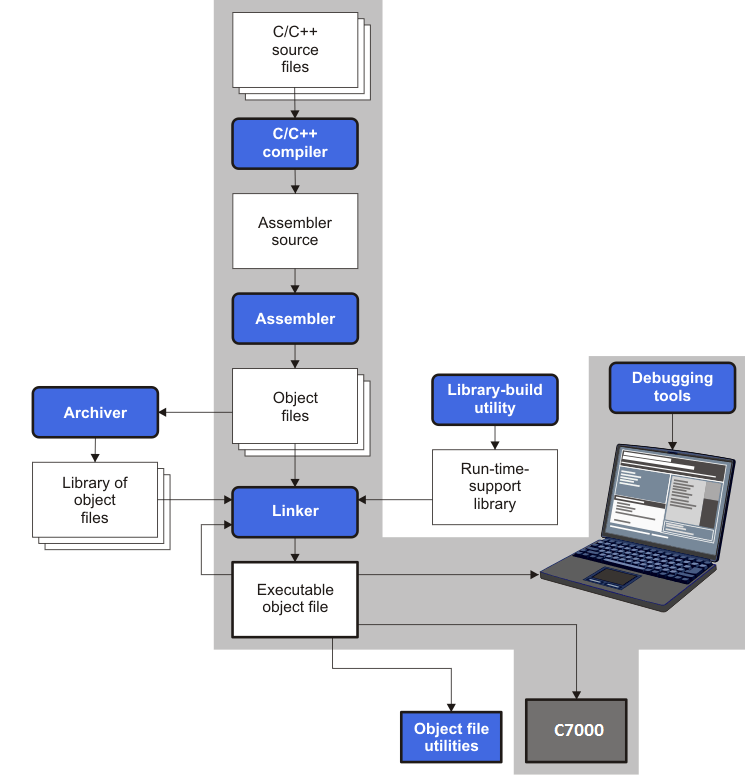
Figure 1-1 illustrates the software development flow. The shaded portion of the figure highlights the most common path of software development for C language programs. The other portions are peripheral functions that enhance the development process.
The following list describes the tools that are shown in Figure 1-1:
- The compiler accepts C/C++ source code and produces C7000 assembly language source code, which it automatically translates into machine language relocatable object files. See Section 3.
- The linker combines relocatable object files into a single absolute executable object file. As it creates the executable file, it performs relocation and resolves external references. The linker accepts relocatable object files and object libraries as input. See Section 11 for an overview of the linker.
- The archiver allows you to collect a group of files into a single archive file, called a library. The archiver allows you to modify such libraries by deleting, replacing, extracting, or adding members. One of the most useful applications of the archiver is building a library of object files.
- The run-time-support libraries contain the standard ISO C and C++ library functions, compiler-utility functions, floating-point arithmetic functions, and C I/O functions that are supported by the compiler. See Section 7.
The library-build utility automatically builds the run-time-support library if compiler and linker options require a custom version of the library. See Section 7.4. Source code for the standard run-time-support library functions for C and C++ is provided in the lib\src subdirectory of the directory where the compiler is installed.
- The C++ name demangler is a debugging aid that converts names mangled by the compiler back to their original names as declared in the C++ source code. As shown in Figure 1-1, you can use the C++ name demangler on the assembly file that is output by the compiler; you can also use this utility on the assembler listing file and the linker map file. See Section 14.
- The main product of this development process is an executable object file that can be executed on a C7000 CPU that is part of a larger device.
In addition, the following utilities are provided to help examine or manage the content of a given object file:
- The object file display utility prints the contents of object files and object libraries in either human readable or XML formats. See Section 13.1.
- The disassembler decodes the machine code from object modules to show the assembly instructions that it represents. See Section 13.2.
- The name utility prints a list of symbol names for objects and functions defined or referenced in an object file or object archive. See Section 13.3.
- The strip utility removes symbol table and debugging information from object files and object libraries. See Section 13.4.